
Sheep and cattle farm dashboard
Your flock's key numbers, on one screen.
See your sheep, cattle and fields, who's in withdrawal and who's due this week as soon as you log in. Then open the livestock table, set up your way.
30 days free, no payment details needed

What needs doing, listed
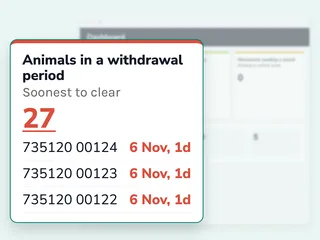
Animals in withdrawal, soonest to clear first, medicines near expiry and movements missing a count. Every number opens the list behind it.
Your tiles, in your order
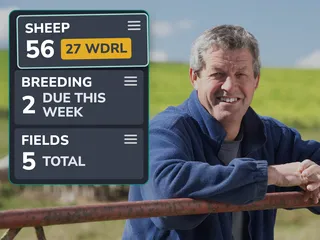
On your phone, the home screen shows tiles for your animals, fields, treatments, medicines and breeding. Drag them into the order you check them.
A livestock table set up your way
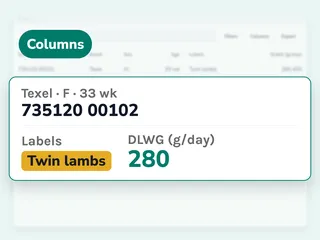
Choose the columns you need, from breed and labels to daily gain and condition score. Your choice is kept, and exports use it.


How to check your farm at a glance


Dashboard questions
Short answers before you start your free trial.
What does the dashboard show?
Counts of your sheep, cattle, other livestock and fields, treatments in withdrawal, medicines in date and animals due to give birth this week, with lists of what needs attention.
Does it work on my phone?
Yes. Your phone's home screen shows count tiles over your field map. The full dashboard and livestock table are made for a computer.
Which columns can I add to the table?
Animal details such as breed, status, date of birth and due date, lineage such as dam and sire, and records such as daily gain, last weight and condition score.
Can I export the table?
Yes, as a spreadsheet with the columns you have chosen, for the whole list or just the animals you select.
Does it count cattle too?
Yes. Sheep, cattle and other livestock each get their own count.
Works well with

Culling insights
Rank your breeding sheep from your own records, so culling decisions rest on data.
Learn more
Weights and growth
Record weights by hand or with your reader, and see daily live weight gain.
Learn more
Animal records
Every animal with its own profile. Search, filter and sort by breed, sex, age and status.
Learn more
Lambing and lineage
Register births, link lambs to dams, and compare ewes on lambing and mothering.
Learn moreSee your flock’s numbers this week.
30 days free, no payment details needed