
Import flock records
Bring your whole flock in from the spreadsheet you keep.
Upload your list as it is, check what FlockFinder found and add every animal in one go. Start on your phone, finish on a computer.
30 days free, no payment details needed

Use the spreadsheet you already keep
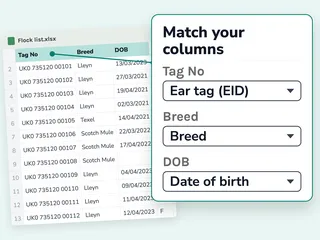
Upload your own spreadsheet, with no template to copy into. FlockFinder matches your columns and you check them.
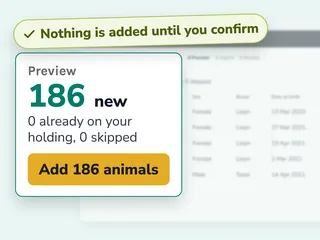
Nothing added until you say so
Fill any gaps for every animal at once, then review what's new before anything is added.
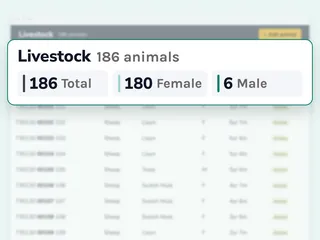
Your whole flock, ready to work with
Every animal lands on your list in one go, ready for treatments, weights and movements.


How to import your flock from a spreadsheet


Import questions
Short answers before you start your free trial.
Can I upload from my phone?
Start on your phone and finish on a computer or tablet, where your spreadsheet is easier to check.
What files can I upload?
CSV and Excel spreadsheets with one animal per row. Split very large lists into smaller files.
What if some rows are not right?
FlockFinder tells you which rows it can't use and why, so you can fix them and upload them again.
Will uploading the same file twice add animals twice?
No. Animals already on your holding are left as they are.
Can I undo an upload?
Yes, as long as nothing else has been recorded against those animals yet.
Can I upload weights too?
Not with your animal list. Weights and scores are recorded in bulk separately.
Works well with

Animal records
Every animal with its own profile. Search, filter and sort by breed, sex, age and status.
Learn more
EID readers
Pair a Bluetooth EID reader, like our FlockFinder FDX Reader, and scan tags into the app.
Learn more
Weights and growth
Record weights by hand or with your reader, and see daily live weight gain.
Learn more
Field mapping
Draw fields on a satellite map, see stocking rates and keep a history of every field.
Learn moreGet your flock in this week.
30 days free, no payment details needed